Computer problems???

If you have any computer problem ,please post your problems here in the comment. We will try to help. go here to post your comment

Monday, August 13, 2012

Get Paid to Use social site

    How many hours do you waste your time in facebook daily? The answer may be different for different people. It may be 1 hour , 2 hour or may be more. Do you know  your time is money for facebook owners? That means they earn money because you spend time in facebook. Now what if you earn money for spending your time ? Yes you can , not in facebook , but in a great site called Matesgate.
          Yes i agree , there are many sites who pay you to be socialise . But Matesgate is unique than all of them . Most of the site has minimum payout  which may take you years to reach  (specially for Non-US person). But Matesgate is different , you get paid monthly based on your credits even at 1 cent (which is paypal minimum). You may choose Alertpay as your payment processor too. Then how can you get credit? Guess first. ….No , you are wrong in guessing  , you don’t have to do online surveys or difficult tasks to get credits (like in many other sites) , you just have to use it like you use facebook. Login , commenting ,wall posting , chatting, playing games , watching TV  etc. etc. in many ways you earn credits there. Not only that , there is Login Lotto and many lucky newbies are now directly full member (a member who have more ways to earn) due to the lotto.
         Not only that , admin share the revenue earn to all the full members in every three month . Now lets talk promoting your business in Matesgate. Matesgate is now a huge network with thousands of people from all around the world.You can promote your business in link tab there to expose your business to whole member at once. Beside, you can put your refferal links or any other task  in”  get credit for” section , you  can use matesgate credits for people to do that task.
          Now let us go to another good section called income generator section in Matesgate.Here you can  join  certain sites under matesgate refferal and can get credits to earn in other sites too. For eg: If you join Triond under matesgate , you get 1000 credits per article there  so that you can earn from Triond as well as matesgate. Isn’t it great?Also your Triond link is promoted  in their chat periodically so that you can boost your earning.
         Now lets talk about  admin and mods there. They are the most friendly and helpful person in the world . You can experience  your homely environment for sure. I consider admin as my big brother there and call him bro , he is so friendly.
             So what are you waiting for ? It’s all free and don’t cost you a penny .So join it in the link below. You can write “Yashasvi ” in who refer you tab if you think i deserve so. Thanks
 Click Here

Friday, July 13, 2012

MSP-2013 from IOE ,Pulchowk

          Recently, new MSPs were selected in 13th the friday. The lucky one from our college are Miss. Alisha Thapaliya , Miss. Puza Shrestha , and Mr. Chandan Gupta(Dai). It's natural that i am a bit disappointed as i am not selected for it . But i am not so sad , since i have already assumed the results early and i have already made my mind to be strong. I had already known that there is very less chance for me to be this year MSP , since they deserve more than me.

          As Allen sir said , it's like sports where win and loose is compulsory . And i am happy in the sense that both girls from my class were selected . and also my MSP orientation partners Miss Sagina and Miss Ranjana are MSPs now.

         As Allen sir said there were few non-MSPs who are very  active and have equal contribution , I know i cannot be compared with them , but i will try my best to work with MSPs 2013 , so that i can also contribute a little .It will be my pleasure if i am able to do so.

        Atlast , congratulation to all the current MSPs. And to those who are not selected(like me) , i suggest not to be disappointed but work hard to prove you deserve to be MSP of next year.
                                                      Good day!!!

Monday, July 2, 2012

3rd orientation for MSP applicants


      Recently Microsoft Innovation Centre, Nepal finished the 3 orientations for the applicants of MSP 2013.I was one of the participants in 3rd orientation of MSP applicants.I am going to share here my experience of that BIG  day.

      I wake up a little early that day , i don't know why but may be due to excitation. After my daily usual activities i reach MIC , Nepal at 11:15 am , there were very few people at  that time.We were given microsoft bag, pen ,diary and T-Shirt.  We were informed that the program will start at 11:30 , But the actual program starts at 12:00 am . We were hearltly welcomed my Junu Mam that time.

        I was very much excited when Sir Allen Bilochan Tuladhar interacted with us. He was my idle from the day i know about Microsoft Nepal and it's very great to interact with our idle live to live  as we all know , he has great contribution in developing the IT field in Nepal . I came to know that he was very friendly and funny person too.

       Now, after some introductions,we were told to express ourself that how we want people to know us in future when we are dead in the form of condolense. It may sounds a little wierd but was great fun to do so. Allen sir told us to make pair with a person whom we don't know to discuss about condolence . I was little confused and nervous how to choose my partner. But Allen sir make that easy. He chooses Miss Ranjana Dangol for me . She was really co-operative partner for me . We discuss our idea throughout the lunch .After lunch i was a bit nervous thinking how to present  my condolence message.

       Again , allen sir instruct us to find a new partner , this time i myself find miss Sagina as my partner who is equally friendly and helpful. Then it comes my condolence presentation time . I was a bit nervous but things went ok i guess. After that there comes a video recording part of  the question "What big difference  do you want to make? " .It also went ok i guess.

          In this way , the fantastic orientation ends. The live concert from  Purge Catharsis was awesome . Interview from Aashish dai , Midusa di and other ex-MSPs were inspiring.

          Thanks to Allen sir , Junu mam and other for the wonderful day.I really enjoy the day making new friends and learning something .


Sunday, July 1, 2012

Microsoft's surface

Microsoft is still no. 1 software company in the world . With it's huge success in software world , it is nowadays also starting it's step into hardware fields. The latest example of it is MICROSOFT SURFACE , which is coming soon.
         
                According to microsoft "Surface is a tablet with a unique expression of entertainment and creativity. A tablet that works and plays the way you want. A new type of computing. "

             It is said that it is a tablet with attachable keyboard and windows 8 operating system which can be even used as a laptop     It seems that it is comparatively going to be cheaper that "Ipad or Samsung Pads". But again question is "can it compete with those pads?" or "it will just be like another Amazon Kindle?"

             It is to be noted that the cheaper Amazon Kindle Pad gain huge popularity while releasing but sooner it can't struggle the world of tablets.

              Here are some pictures of microsoft's surface:


Saturday, April 7, 2012

Our first C project using SDL

This is our first C project using SDL(by me along with my friends Suhit, Sooraz and Pranesh) , it's name is AWESOME SHOOTING STARS. Download the whole zip file here.I hope you like it . If you have any question feel free to ask me. (Note your compiler should support SDL graphic library to open the game).Guide to install SDL is given in another post. Download here

Monday, April 12, 2010

How to install WINDOWS from USB using its iso file?

First you should create live USB in your USB disc
Requirements to create bootable Windows USB:
(1) Windows 7, Windows Vista or Windows XP iso file.
(2) Pen drive with 4 GB space for Windows vista, Windows 7 and 2 gb for Windows XP.
How to create?
1. Insert your USB drive to your computer and backup all the files from the USB .
2. Now download Win To Flash tool (free) from here.
3. Run the WinToFlash, and browse to your Windows 7, Vista, or XP iso files in PE files source path and locate your USB drive in USB Drive.

4. Click Create button to begin the bootable USB process. Wait for few minutes to see the bootable USB.
Now you can boot.
Restart your computer. Press del automatically after the power is given. Go to bios setup. Select first bootable device as USB-Jip and Press Esc and select save and exit and select Y and enter and your computer will again power on and it will be booted.

Browsers

Here are some Internet browsers-


1. Microsoft Internet explorer - It is one of the fastest browsers developed by Microsoft.The link to download Internet explorer is here


Internet Explorer 8
It is the latest, fastest and most reliable version of internet explorer. It is mostly used browser in the world. It was released on march 19 2009 only for windows. It is the last version that is supported in windows xp. Internet explorer 9 only supports in windows vista and windo
ws 7.


2. Mozilla Firefox
It is considered as best browser overall in todays world. It is developed by mozilla.Link to download mozilla is here


Firefox 11.0
It is the latest version of mozilla firefox browser.  It is widely used in today world.


3.Google chrome
It is the web browser developed by google.It uses
the WebKit layout engine and application framework.It is very fast browser.It is supported in:

Windows (XP SP2 and later)
Mac OS X (10.5 and later, Intel only)
Linux
Link to download google chrome is
http://www.google.com/chrome


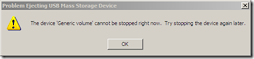
The Device Generic volume cannot be stopped right now. Try stopping the device later

When you try to safely remove hardware>safely remove usb disc like pen drive,memory card reader, datacable have you ever face the problem like this-


Solution

1.Download
Unlocker and install it on your computer. The link to download the unlocker is http://www.brothersoft.com/download-unlocker-208761.html

2. Right click on your USB drive in my computer and select Unlocker.

3. A dialog box appears that will list all the busy handles of files being used on your USB drive. Now click the button which says Unlock All

Now try to remove your USB drive through “Safely Remove Hardware” dialog.

If still you are not able to remove USB drive then try clicking the Kill Process button in Unlocker.

Cannot delete:It is being used by another person or program Close any..


While you try to delete some files or folders.Have you ever face the problem like this-

Solution

The solution is unlocker

(1) Download Unlocker and install it on your computer. The link to download the unlocker is http://www.brothersoft.com/download-unlocker-208761.html
(2)Right Click the file or folder and select Unlocker


(3)A dialoge box appear

(4)Click unlock all then try to delete if still not selected click kill process in unlocker window
Back to top

Minimum System requirement of Windows Xp & Windows 7

Windows Xp

These are the minimum requirements of windows xp for basic functionality. Actual requirements may vary, depending on the system configuration and the programs and features that you choose to install.

(i) minimum system requirements for Windows XP Home Edition

  • Pentium 233-megahertz (MHz) processor or faster (300 MHz recommended)
  • 64 megabytes(MB) of RAM (128 MB recommended)
  • At least 1.5 gigabytes (GB) of available space on the hard disk
  • CD-ROM or DVD-ROM drive
  • Keyboard and a Microsoft Mouse or some other compatible pointing device
  • Video adapter and monitor with Super VGA (800 x 600)or higher resolution
  • Sound card
  • Speakers or headphones

For more information about system requirements for Windows XP Home Edition, visit the following Microsoft Web site:

For more information about Windows XP Home Edition, visit the following Microsoft Web site: http://www.microsoft.com/windowsxp/home/howtobuy/choosing2.mspx

(ii)minimum hardware requirements for Windows XP Professional

  • Pentium 233-megahertz (MHz) processor or faster (300 MHz recommended)
  • 64 megabytes (MB) of RAM (128 MB recommended)
  • At least 1.5 gigabytes (GB) of available space on the hard disk
  • CD-ROM or DVD-ROM drive
  • Keyboard and a Microsoft Mouse or some other compatible pointing device
  • Video adapter and monitor with Super VGA (800 x 600) or higher resolution
  • Sound card
  • Speakers or headphones
For more information about system requirements for Windows XP Professional, visit the following Microsoft Web site:
http://www.microsoft.com/windowsxp/pro/evaluation/sysreqs.mspx (http://www.microsoft.com/windowsxp/pro/evaluation/sysreqs.mspx)
For more information about Windows XP Professional, visit the following Microsoft Web site: http://www.microsoft.com/windowsxp/pro/default.mspx (http://www.microsoft.com/windowsxp/pro/default.mspx)

Windows 7

These are the Minimum System requirement of Windows 7-
  • 1 gigahertz (GHz) or faster 32-bit (x86) or 64-bit(x64) processor

  • 1 gigabyte RAM (32-bit) or 2 GB RAM (64-bit)

  • 16 GB available hard disk space (32-bit) or 20 GB (64-bit)

  • DirectX 9 graphics device with WDDM 1.0 or higher driver

  • back to top

Shortcut keyboard key in windows xp

  • CTRL+C - (Copy)
  • CTRL+X (Cut)
  • CTRL+V (Paste)
  • CTRL+Z (Undo)
  • DELETE (Delete by sending to recycle bin)
  • SHIFT+DELETE (Delete permanently without sending the files or folders to the Recycle Bin)
  • Press CTRL and drag an item with mouse to create a copy.
  • Press CTRL+shift and drag an item with mouse to create a shortcut.
  • F2 key (Rename)
  • CTRL+SHIFT with arrow keys (Highlight a block of text)
  • SHIFT with the arrow keys (Select more than one files or folders in a window or on the desktop, or select text in a document)
  • CTRL+A (Select all)
  • F3 (Search )
  • ALT+ENTER (View the properties of the selected file or folder)
  • ALT+F4 (Close the active file or folder)
  • ALT+SPACEBAR (Open the shortcut menu for the active window)
  • ALT+TAB (Switch between the open items)
  • ALT+ESC (Cycle through files or folders in the order that they had been opened in the task bar)
  • F4 (Shows the Address bar list in My Computer or Windows Explorer)
  • SHIFT+F10 (Display the 'right click tab' of selected item)
  • CTRL+ESC (Display the Start menu)
  • Windows key(Display the Start menu)
  • F10 (Activate the menu bar in the active program)
  • RIGHT ARROW (Open the next menu to the right, or open a submenu)
  • LEFT ARROW (Open the next menu to the left, or close a submenu)
  • F5 (Update the active window)
  • BACKSPACE (View the folder back in my computer or windows explorer)
  • ESC (Cancel )
  • SHIFT when you insert a CD-ROM into the CD-ROM drive (Prevent autoplay)
  • CTRL+SHIFT+ESC (Open Task Manager)
  • CTRL+ALT+DELETE(Open Task Manager)
  • back to top

5 ways to Speed up your pc(Speed up windows)

You can speed up your PC

A.Delete unwanted files from disc(delete cookies,dublicate files ,history ,cache ,temps etc) - If you delete unwanted files and make some space ,your pc will be fast


B.Disc clean up
Windows 7
  1. Start>All Programs> Accessories>System Tools, > Disk Cleanup.

  2. You will have to specify which drive you want to clean.

  3. When Disk Cleanup finish calculating how much space you can free, in the Disk Cleanup dialog box, the dialog box appear like this-

  4. Disk Cleanup dialog box

4.Cheak box for files you will like to delete and then press Ok When you are prompted to confirm that you want to delete the specified files click yes

Windows XP

  1. Start>All Programs> Accessories>System Tools, > Disk Cleanup. You have to specify which drive you want to clean.

    Disk Cleanup dialog box
  2. In the Disk Cleanup dialog box, scroll the content of the files you want to delete & check it to delete

    Choose the files that you want to delete.
  3. When you are prompted to confirm that you want to delete the specified files, click Yes.

C. Disc defragment

To use Disk Defragmenter:

Windows 7

  1. Start >All Programs >Accessories>System Tools> Disk Defragmenter.

    Click Analyze disk to start the Disk Defragmenter.


  2. In the dialog box, click the drive that you want to defragment, and then click the Analyze button.After it is analyzed A dialog box appears, letting you know whether you should defragment the analyzed drives.

  3. To defragment the selected drive or drives, click the Defragment disk button.Then it will be defragt

Windows Xp

  1. Start> All Programs >Accessories >System Tools >Disk Defragmenter.

    Click Analyze disk to start the Disk Defragmenter
  2. In the dialog box, click the drive that you want to defragment, and then click the Analyze button. After it is analyzed A dialog box appears, letting you know whether you should defragment the analyzed drives.

  3. To defragment the selected drive or drives, click the Defragment button.Then it will be defragged.

D. Repair disk errors

To run the error checking

  1. Close all open files.

  2. Start>My Computer.

  3. Right-click the hard disk you want to search for bad sectors, and then click Properties

  4. In the Properties dialog box, click the Tools tab.

  5. Click the Check Now button.

  6. In the Check Disk or error checking dialog box select the Scan for and attempt recovery of bad sectors check box, and then click Start.

    Check Disk Local Disk dialog box, with the Scan     for and   attempt recovery of bad sectors check box selected.

  7. If bad sectors are found, fix them.

E.Be protected against virus

Install a good antivirus and scan your pc.You can also get free version of antivirus.
Some of the links of antivirus are-

www.avast.com/free-antivirus-download
www.free-av.com
free.avg.com
www.bitdefender.com/PRODUCT-14-en--BitDefender-Free-Edition.html
www.kaspersky.com/virusscanner

back to top

Enabling group policy(gpedit.msc)

Have you ever faced the problem 'group policy has been disabled by your administator'
Cause and solution

A.Group Policy has been disabled by your somebody in administrator account using mmc
Solution

(a)Click on Start then Run Type mmc and press enter


(b)Click on file menu and select Add/Remove Snap-in...

(c)click on add and select group policy object editor and click add

(d)click finish.

(e)click close and group policy object editor will appear in the dialog box.

(f) click ok and you will be able to access the group policy from mmc.

B.It may have been disabled by virus, malwares, spywares etc
Install a good antivirus and scan your pc and follow the step above steps.You can also get free version of antivirus.
Some of the links of antivirus are
www.avast.com/free-antivirus-download
www.free-av.com
free.avg.com
www.bitdefender.com/PRODUCT-14-en--BitDefender-Free-Edition.html
www.kaspersky.com/virusscanner
back to top

Enabling registry editing(regedit)

Have you ever face the problem like this-

Cause & solution

A.Regedit has been disabled by somebody in - administrator account using group policy(gpedit)
Solution
a Go to Start then Run then type Gpedit.msc and press Enter button.
b. click on User Configuration then Administrative Templates then system then Prevent access to registry editing tools
c.set to disable to enable regedit
B.It may have been disabled by virus,malwares,spywares etc
Install a good antivirus and scan your pc and follow the step above steps.You can also get free version of antivirus.
Some of the links of antivirus are
www.avast.com/free-antivirus-download
www.free-av.com
free.avg.com
www.bitdefender.com/PRODUCT-14-en--BitDefender-Free-Edition.html
www.kaspersky.com/virusscanner
back to top

Sunday, April 11, 2010

Enabling Task Manager
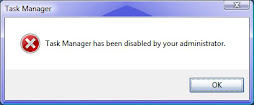
Have you ever faced the problem like this:


Cause & solution for it

A.Task manager has been disabled by your somebody in administator account using registry editing(regedit)or group policy(gpedit)

Solution
1 using group policy
a
Go to Start then Run then type Gpedit.msc and press Enter button.
b. click on User Configuration then Administrative Templates then System then Ctrl+Alt+Del Options
c click on remove task manager
d set to disable to enable task manager.

2. using registry editing
a.Go to Start then Run then type regedit
b.double click HKEY_CURRENT_USER then Software\Microsoft\Windows\CurrentVersion\Policies\System then DisableTaskMgr then REG_DWORD then put o as value to enable task manager.
B.It may have been disabled by virus,malwares,spywares etc
Install a good antivirus and scan your pc and follow the step above steps.You can also get free version of antivirus.
Some of the links of antivirus are
www.avast.com/free-antivirus-download
www.free-av.com
free.avg.com
www.bitdefender.com/PRODUCT-14-en--BitDefender-Free-Edition.html
www.kaspersky.com/virusscanner
back to top

LIVE COUNTER